













Skip to content

    Switchboard

    Switchboard.
    Your team's AI workspace.

    We set up Switchboard for your team, connected to your business systems through EdgeKeeper. We help you create AI agents for the work your team needs done. Make as many AI agents as you want, for any job. Each agent reads and reports, keeps its own notes, and can build dashboards and scheduled reports. Agents are read-only and can be limited to the systems you choose. Grace, the in-app guide, can help you get started.

    There is no limit on how many you make. Anything that changes your systems is built with you, with a business case.

    How making an agent works

    Yours, as many as you want

    Illustrative portraits. Your agents get the names you give them.

    Your work, together

    A place for the work.
    And the agents who help.

    Bring your systems, your business knowledge, and your AI agents together. Give an agent a job, follow its progress, and review the result. Keep the agents you rely on. Bring in others for a single task.

    Illustrative Switchboard preview. We scope the workspace and connections around your business. Your team can create read-only agents for the jobs it needs help with.

    Automated EdgeSwitchboard
    Illustrated AI agent Maya
    MayaCustomer preparationAI agent
    Illustrated AI agent Priya
    PriyaOperations · AvailableAI agent
    Illustrated AI agent Maya
    Maya’s deskAI agent · Customer preparation

    Prepare tomorrow's customer briefing

    Example
    Give it a job

    A clear brief to start.

    Your brief

    Prepare a briefing for tomorrow's customer meetings.

    Maya’s agreed task: prepare the meeting context and questions for your review.

    Current
    Prepare the customer briefing
    Just done
    Task and example sources identified
    Next
    Review the meeting context

    How it works

    How making an AI agent works.

    1. 01

      We connect your systems

      EdgeKeeper links the systems we connect for you. That foundation is what every agent reads from.

    2. 02

      Describe the job

      “I want an agent that checks new enquiries each morning and tells me which ones nobody has answered.” Describe what you need in Switchboard, in plain words. Grace, the in-app guide, can help.

    3. 03

      Give it a clear brief

      Choose its name, the job, the Space it works in and the connected systems it may read. Make as many agents as you want, each with its own purpose.

    4. 04

      Put it to work

      It works in the Space you put it in, remembers what it learns, and builds dashboards and scheduled reports when you ask.

    What every agent gets

    What every agent gets.

    Whatever job you describe, every AI agent is built the same way.

    • A clear job

      One brief: the questions it answers and the known-good ways to find the answers.

    • The systems you choose

      Limit it to the connections you pick, or let it read everything you have connected.

    • A memory of its own

      It keeps notes on what it learns about your business, so the next answer starts from them.

    • Read-only with guardrails

      It reads and reports. Any change a system could make stays held back until a person switches it on.

    • Dashboards and reports on request

      Ask it for a dashboard or a scheduled report and it builds one. A scheduled report is how it delivers every morning.

    • Honest coverage

      It says what it can see and what it cannot.

    Make your own

    Ideas for your own.

    There is no fixed list and no limit on how many you make. A few asks businesses start with:

    • “Every morning, tell me which customer enquiries from yesterday still have no reply.”
    • “Build me a weekly report of overdue invoices, grouped by customer.”
    • “Track contract and subscription renewals due in the next 60 days.”
    • “Before each customer meeting, summarise their open requests and recent orders.”
    • “Show me a dashboard of quotes sent this month and which ones were accepted.”
    • “Find jobs that were rescheduled more than twice this month.”

    A living org chart

    Put AI exactly where your business needs it.

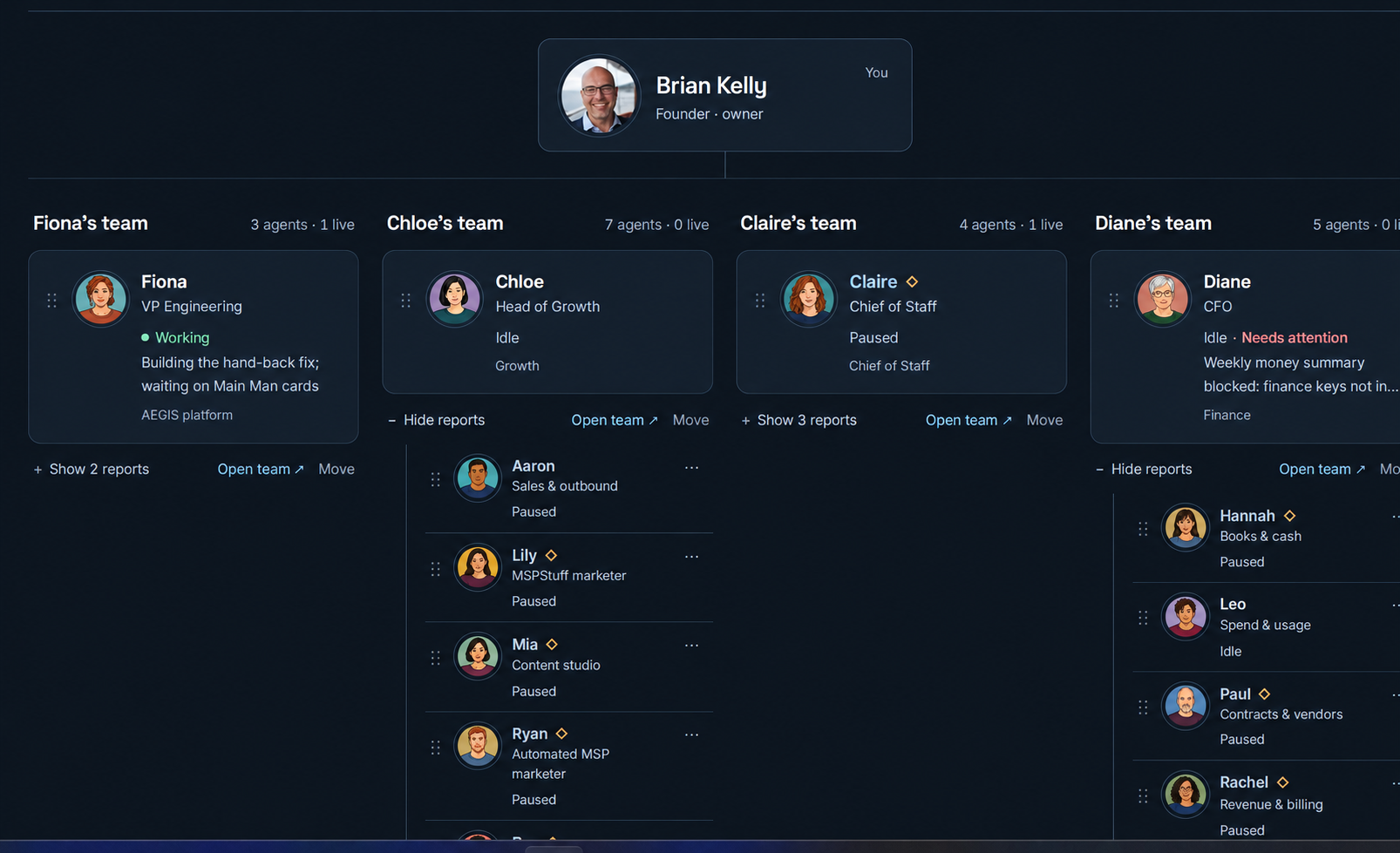
    Place AI agents alongside your people, in any department or role where they can help. Give them a job, set who they report to, and move them as the work changes. Each agent works with the context and permissions defined for its role.

    Our working org chart showing departments, people and AI agents connected by reporting lines.
    Our working org chart: agents organized by department, role and reporting line.
    View the full-size org chart

    Your business changes. Your AI team moves with it, with clear responsibilities, controlled access and human oversight.

    The boundary around useful work

    Useful AI needs clear boundaries.

    An agent may read an email, a document or a web page containing instructions it should not follow. The system around it must limit what it can see and do. EdgeKeeper combines scoped access, read-only questions, approval for specific changes and access records you can review.

    For small businesses

    Read-only AI agents for small businesses

    Most small businesses do not need an AI that acts on its own. They need someone who reads the systems every morning and says what needs attention. That is what a read-only agent does.

    It sees the systems you choose, answers questions about them, and builds reports and dashboards. It cannot change a record or send anything on your behalf, so you can try one on a real job without it changing anything.

    A front desk could ask for tomorrow’s unconfirmed appointments. An office manager could get a weekly list of overdue invoices. When you want an agent to act, such as preparing a reply to send, that is built with you, and a person approves it.

    When you want it to do things

    Your agents read and report. Changes are built with you.

    Connecting systems, understanding your work and establishing access rules take real effort. EdgeKeeper gives that work a lasting home, so your agents and each new project can reuse it.

    Automations that make changes, apps, and anything that sends on your behalf are built with you. We focus on what the workflow should do, who it helps and whether the benefit justifies the cost.

    A new system or an unusual process may need more work. We identify that in the scope before you decide to build.

    Understand the EdgeKeeper foundation

    Explore Custom Builds

    What we build with you

    Start with the work you want to make easier.

    These are examples of projects we can scope with you. The assessment and your priorities determine what is worth building.

    Automations

    Move information between systems, prepare follow-ups, or take a recurring check off someone’s list.

    What we scopeThe trigger, steps, exceptions and approval owner.

    What makes it pay

    Time saved per run, fewer corrections and faster turnaround.

    Apps

    Give your team one place to handle a task that currently means opening several tools and spreadsheets.

    What we scopeThe users, screens, data sources and actions they need.

    What makes it pay

    Fewer handoffs and less time completing each task.

    Dashboards

    Bring the numbers that matter into one view, with a clear path back to the underlying records.

    What we scopeThe questions, source systems, measures and refresh schedule.

    What makes it pay

    Less time assembling numbers and earlier visibility of problems.

    Reports

    Prepare the weekly summary, reconcile two sources, or assemble a client report for someone to review.

    What we scopeThe audience, source records, format, schedule and reviewer.

    What makes it pay

    Preparation time recovered and fewer reporting errors.

    Agents that take action

    Go beyond read-only: an agent that works through a request and prepares the action, such as a quote or a reply, using approved information.

    What we scopeThe job, allowed tools, decision boundaries and human handoffs.

    What makes it pay

    Faster response, less research time and more work completed per person.

    Agents that act, with a defined job

    Useful help. Clear boundaries.

    Read the full security review

    The agents you make in Switchboard read and report. When you want an agent to act, it uses approved tools and information to work through a task, and we define the job with you: what it can see, what it can do, and when it must hand work to a person.

    For example, an agent could gather customer history, check approved pricing and prepare a quote. A person reviews and approves it before it is sent.

    We test the workflow before rollout, agree human approval for writes and outbound actions, and keep access recorded for review. Your team has someone to contact when the process needs to change.

    Every addition needs a business case

    Scope the work. Show the return.

    A good idea earns its place by improving the business. We compare the expected value with the cost to build, run and maintain it.

    1. 01 / Understand

      Find the opportunity.

      How often does the task happen? How much time does it take? What do errors, delays or missed follow-ups cost? Start with observed work and agree the assumptions.

    2. 02 / Decide

      Agree the scope and price.

      You see the deliverable, systems, permissions, delivery date, acceptance criteria and ongoing costs. Compare them with the estimated benefit and payback before approving the build.

    3. 03 / Improve

      Build, verify and measure.

      We test the agreed behavior with your team, roll it out and compare the result with the starting point. Keep what helps, refine what needs work and use the findings to choose the next addition.

    Expected ROI guides the decision. Actual results depend on the workflow and how it is used; estimates are not a promise of achieved savings.

    How assessment, build and ongoing support are priced

    Before you decide

    Questions we get.

    What is AI automation for a small business?

    Using software to take repeated work off people’s lists: moving information between systems, preparing reports, chasing follow-ups. AI helps where the work means reading or writing, such as summarising new enquiries or drafting a reply for someone to check. In Switchboard, agents read and report. Automations that make changes are built with you, with a business case.

    Can AI run a small business?

    No. It can take on parts of the work: answering questions from your systems, preparing reports, and spotting what has been missed. People still make the decisions. Agents in Switchboard are read-only, and a person approves any change to your systems.

    What would make your day easier?

    Bring us the next piece of busywork.

    Already running EdgeKeeper? Tell us what you want to improve. Starting fresh? We begin with an assessment, identify the opportunities and show you a proposal.

    Start with an assessment

    Free · 30 min · no pitch